ZephyrFTP Download
v0.8.36 · beta SFTP · FTP · FTPS Qt6 GPL-3.0

Both sides of the transfer.
Neither one hardwired.

ZephyrFTP puts your computer and a server side by side, then gets out of the way — drag, drop, or double-click to move things between them. Either pane can be a server, so two hosts can sit side by side too. Windows, macOS, and Linux.

Free and open source, no account, no telemetry. This is beta software — read what it can't do yet before you trust it with anything you can't afford to get wrong.

The real window, rebuilt here in HTML. Skip to actual screenshots.

/why

The parts that actually matter.

Every FTP client says it does the basics. These three are the ones we'd actually put money on.

Neither pane is stuck being “local.”

Most dual-pane clients hard-wire one side to your computer. Here, either pane can be a server — connect both to different hosts and move files straight between them, no detour through a second window. Browsing two remote servers side by side is something even FileZilla and WinSCP don't offer.

A queue you don't have to babysit.

Close the app mid-transfer and it's still there when you open it again — paused work resumes, and anything mid-flight to a server picks back up the moment you reconnect. Nothing vanishes because you closed a window at the wrong time.

Your password lives in your OS's keychain. Never in a file.

Host keys and certificates get the same trust-on-first-use verification real SSH clients use — a fingerprint shown once, a loud warning if it ever changes. Saved sites are plain JSON with zero secrets in them, safe to hand to anyone.

/proof

Not a mockup. The real window.

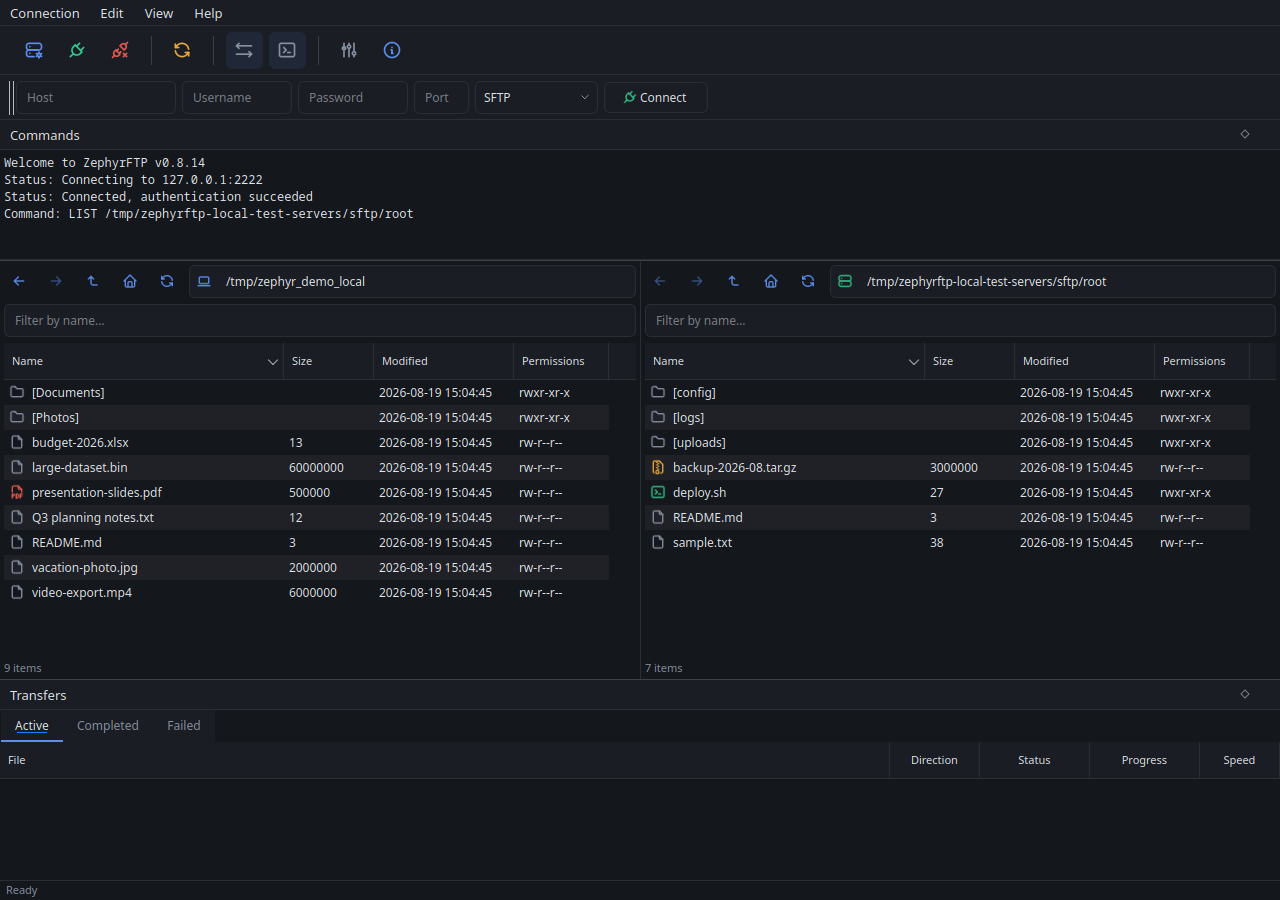
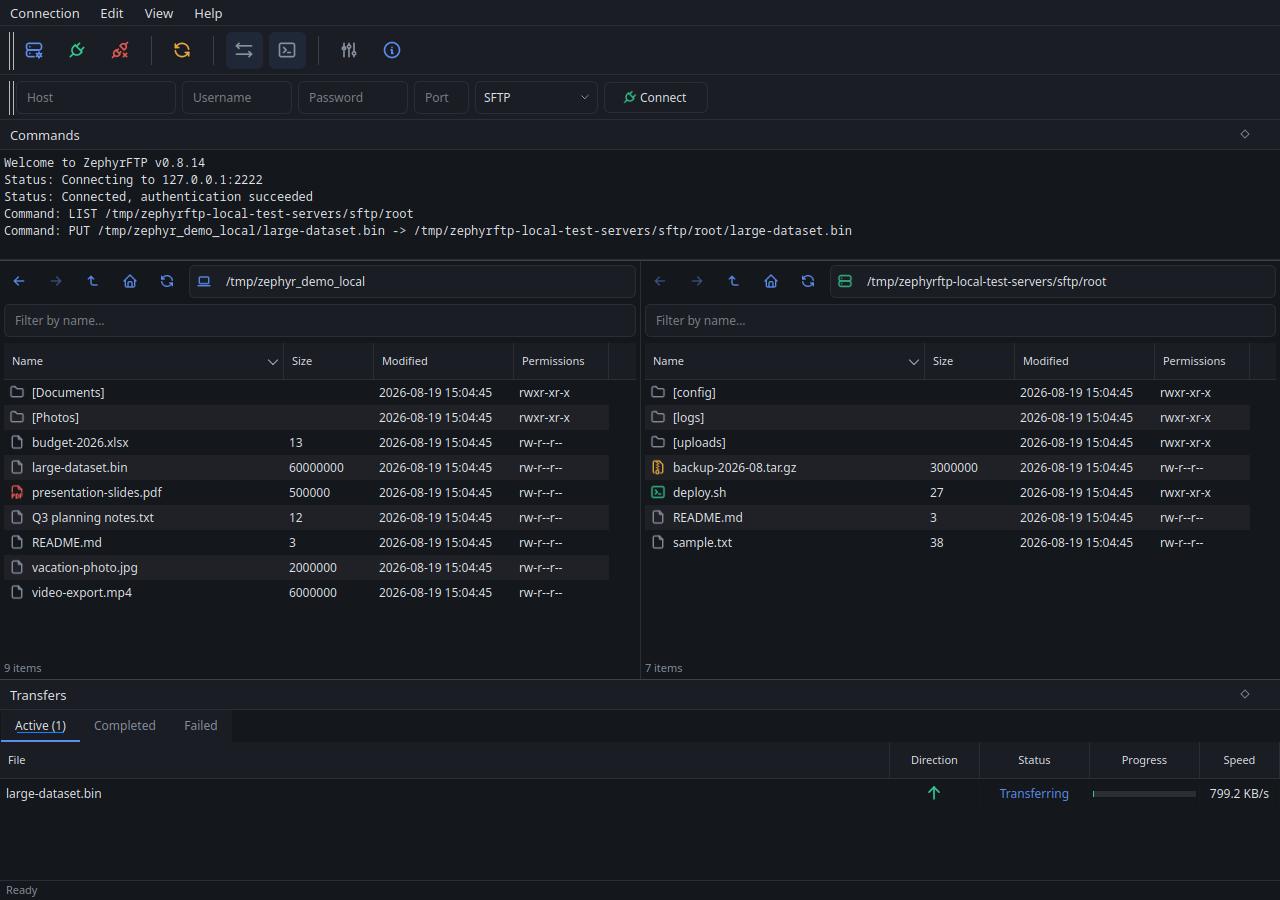
Two panes, each with their own path bar and history, and a transfer queue that shows real progress, not a spinner.

The ZephyrFTP window: a local folder listed on the left, an SFTP server on the right, each with its own path bar, and columns for name, size, modified date and permissions.
Each pane has its own path bar, its own history, and its own connect button.
The ZephyrFTP window with a transfer in progress: the Transfers panel at the bottom shows the file name, direction, status, a progress bar, and the current speed.
A real transfer in progress — real speed, real progress, not simulated.
/docs

There's a lot more under the hood.

Compare-and-sync, scripting from cron, bandwidth caps, up to 10 simultaneous connections per site, a live protocol log, keyboard shortcuts — every feature, documented in full.

This is beta software, in feature freeze heading toward 1.0 — some things are deliberately missing rather than half-built. See exactly what's not built yet →

/why-this-exists

Built because I wanted to use it.

This started as a personal itch, not a business plan. Dual-pane FTP clients have been the standard for decades, but the free ones mostly haven't been redesigned in that time, and the newer, actively-maintained alternatives almost all want a subscription or a real purchase price before you can move a single file. I wanted something that felt like software built today — a real dark mode, a proper Windows installer, an interface you don't need a manual for — without either of those trade-offs. So I built it.

It's still a one-person project, tested as rigorously as I know how and shipped honestly about what it doesn't do yet. If it's ever going to make money, it'll be through optional support from people who find it useful — never a paywall, never a subscription.

/download

Get version 0.8.36.

Every build comes from the same CI pipeline and is attached to the release. No account, nothing phones home.

Windows

zephyrftp-windows-x64-setup.exe

The recommended way in — Start Menu shortcut, Add/Remove Programs entry, a real uninstaller. A portable .zip is also available, but note it's not fully stateless either way: a saved password goes through Windows' own Credential Manager regardless of which one you run.

Download for Windows Get the portable .zip instead

macOS

ZephyrFTP.dmg

Apple Silicon only. The build is unsigned, so the first launch needs a right-click and Open to get past Gatekeeper. After that it opens normally.

Download for macOS

Linux

Four ways, pick one

  • .debapt install ./zephyrftp_0.8.36_amd64.deb
  • .rpmdnf install ./zephyrftp-0.8.36-1.x86_64.rpm
  • .tar.gza single binary, no root needed
  • AppImageQt6, libssh2 and libsecret bundled

The first three link against your system Qt6 and libssh2. If your distro's versions don't match, take the AppImage.

Download for Linux

New to ZephyrFTP? Read the Getting Started guide after installing. Prefer to build it yourself? CONTRIBUTING.md has the build and test instructions, and ARCHITECTURE.md documents how each component works and what has actually been verified.